 Sajilo PatroNepali Calendar for macOS Menu Bar
Sajilo Patro is the free, lightweight, and 100% offline Nepali calendar app for the macOS menu bar and desktop. Displays today's Bikram Sambat (BS) date right beside your Mac clock, syncs with Google Calendar and Apple Calendar, and features official Nepal public holidays 2083, Kathmandu sunrise tithi, and instant BS ↔ AD conversion.
 Download Now (.dmg)
Version 2.3.1 · macOS 11 Big Sur or later · Apple Silicon and Intel · Free · Pro optional
brew install --cask ssarthaks/tap/sajilo-patroUpdate anytime with brew upgrade --cask sajilo-patro
npm install sajilo-patroBS ↔ AD · Holidays · Payroll
Key Details: Mac Menu Bar Nepali Calendar
- What it does
- Places today's Bikram Sambat date in your Mac menu bar. One click opens month view, Nepal holidays (BS 2083), sunrise tithi, and offline BS ↔ AD converter.
- Calendar & Widget Sync
- Syncs with Apple Calendar and Google Calendar on Nepali dates. Free desktop wallpaper widgets for Today, Month, and Upcoming events.
- How to install
- Terminal:
brew install --cask ssarthaks/tap/sajilo-patroor direct universal DMG download. - Free & 100% Offline
- 0% CPU idle usage, zero ads, no tracking. Universal binary for Apple Silicon (M1–M4) & Intel on macOS 11+.
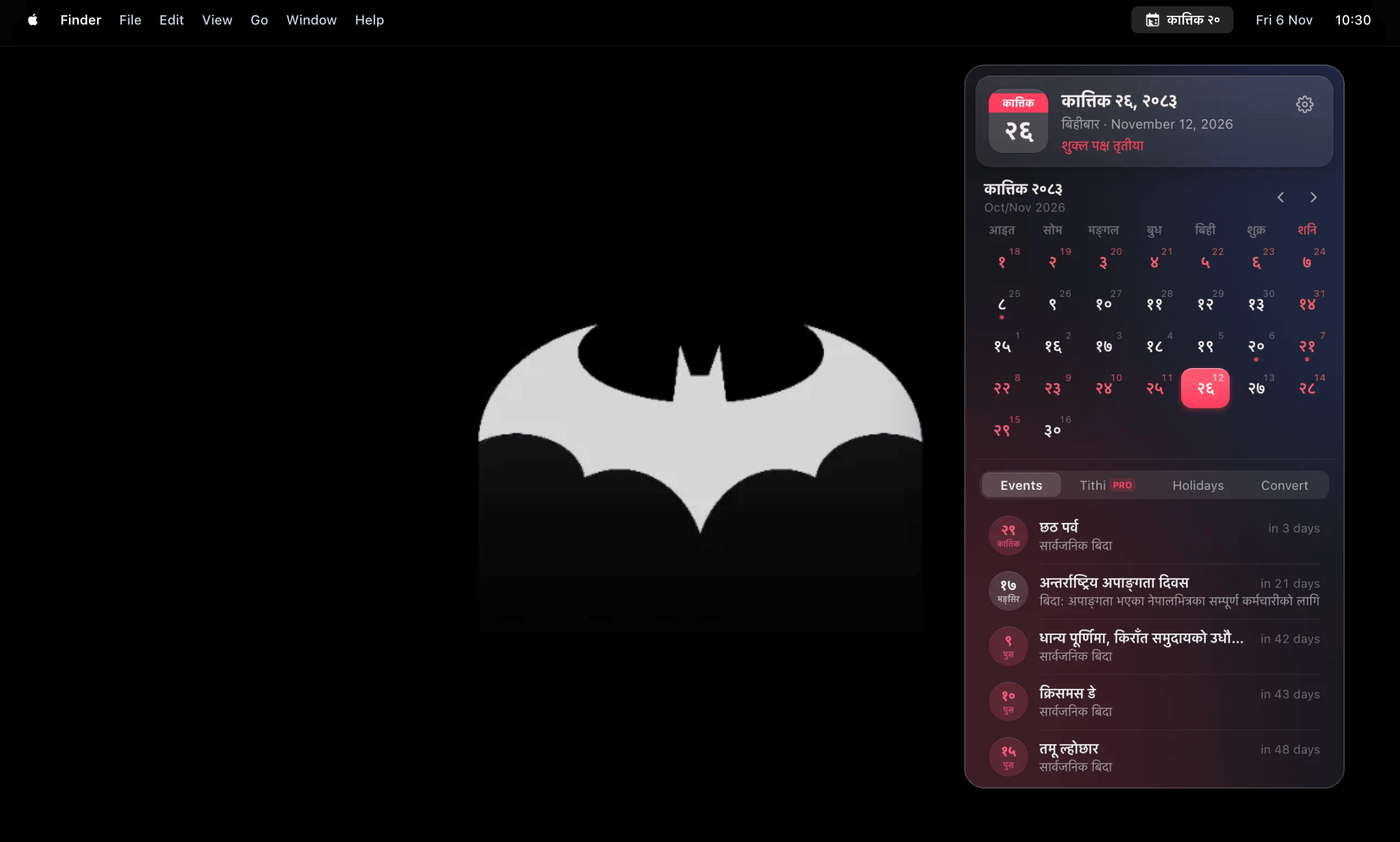
macOS Nepali Calendar
Everything at a glance.
A free macOS Nepali calendar app built for your Mac menu bar and desktop: offline Bikram Sambat dates, BS to AD converter, Nepal holidays and tithi.
Today in your menu bar
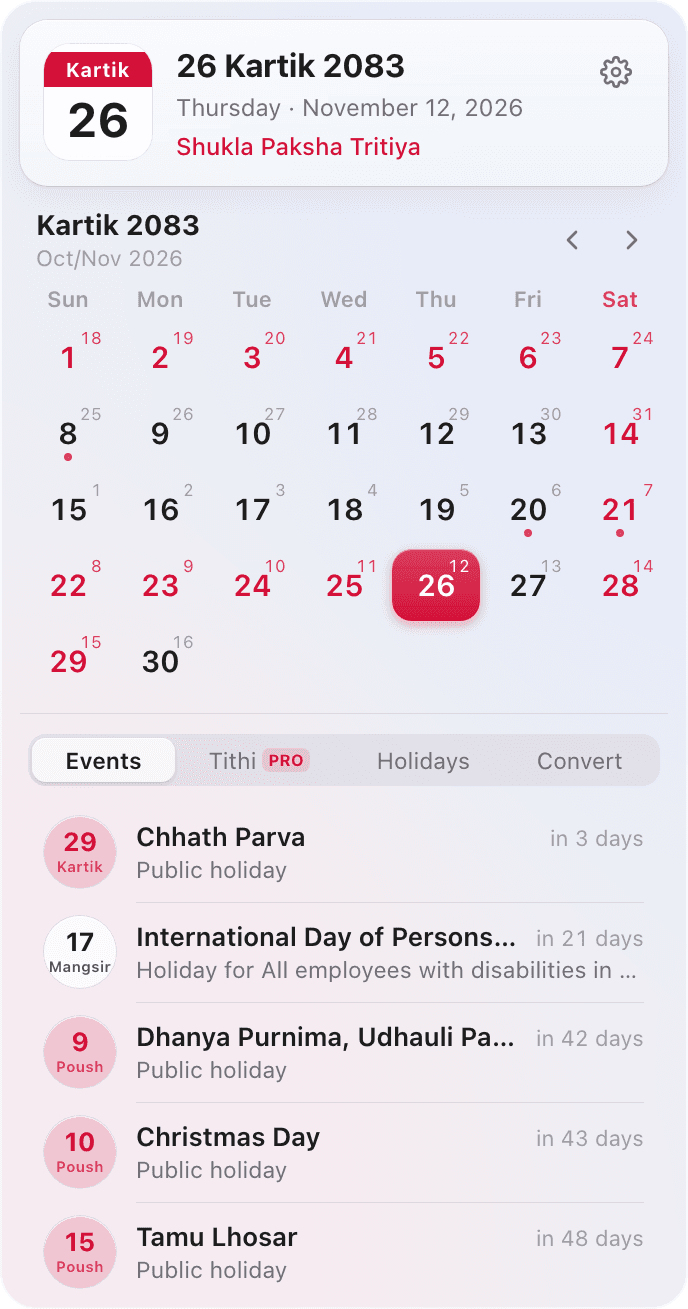
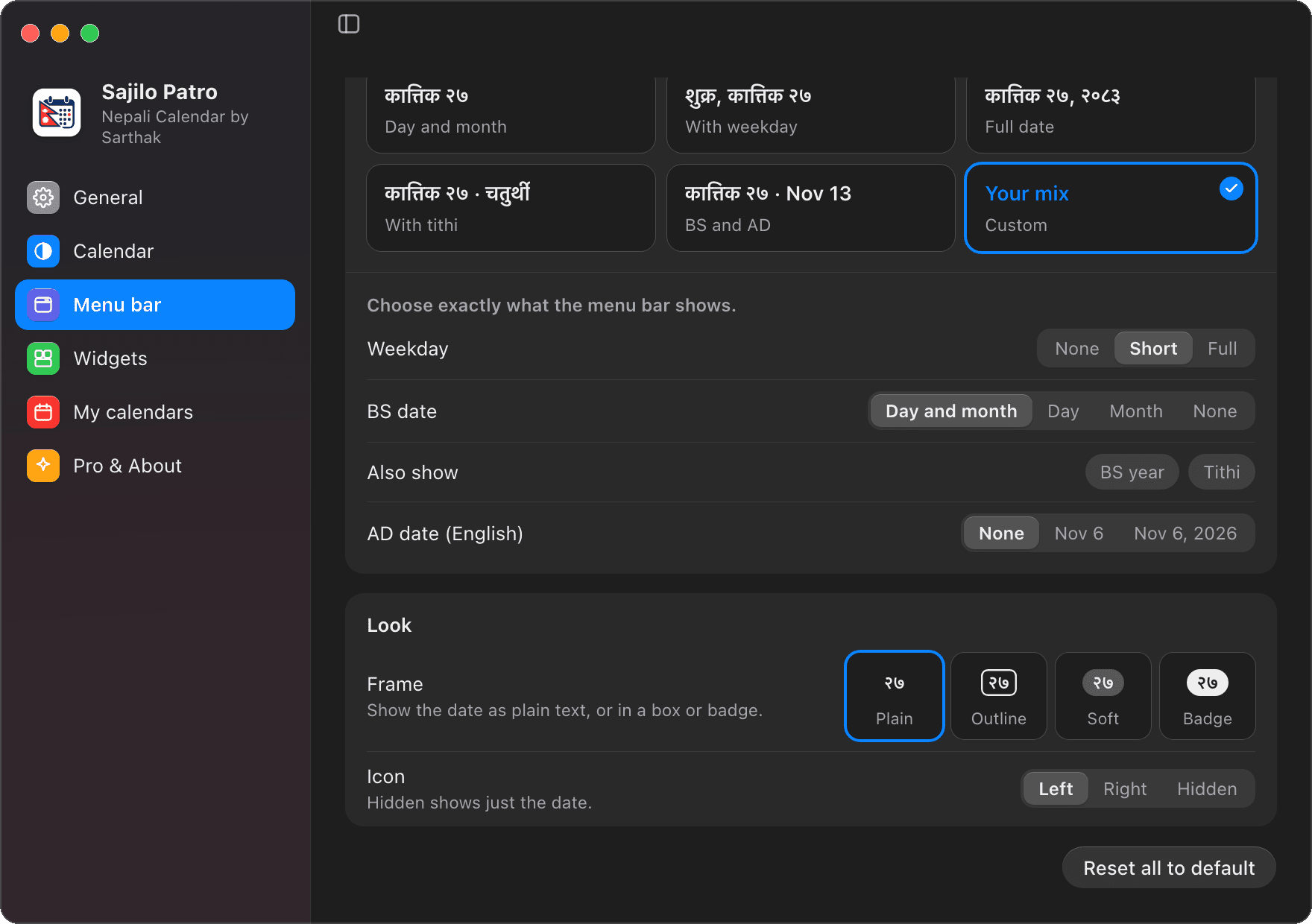
The Bikram Sambat date sits next to your Mac's clock, your way and free: day and month, just the day (२१), the weekday, tithi or the AD date, as plain text or in a box or badge.
Widgets on your desktop
Put a Today card, a Month calendar or Upcoming events on your wallpaper, in glass or clear, small to large. Browse months and click a day right on the desktop.
Holidays and festivals
Government of Nepal public holidays for BS 2083, with who each applies to, and every day of Dashain and Tihar, from Kukur Tihar to Bhai Tika.
Countdown to every event
Click an event to see how long is left: “भाइटीका in 4 days” or “भाइटीका आउन ४ दिन बाँकी”, in English or Nepali.
Tithi for every day
The lunar day for today and any date you pick, calculated at Kathmandu sunrise. Near a tithi change it can differ by a day from a printed panchang.
BS and AD together
Every day shows both calendars, and the Convert tab turns any BS date into AD. AD dates in English, next to the Nepali ones.
Native glass design
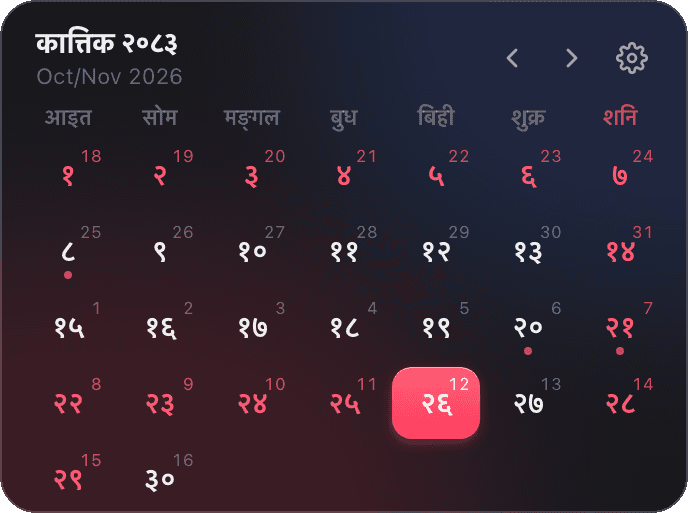
Liquid Glass on macOS 26 Tahoe and macOS's translucent glass on earlier versions, in Light and Dark mode, with a Settings window like System Settings.
नेपाली or English
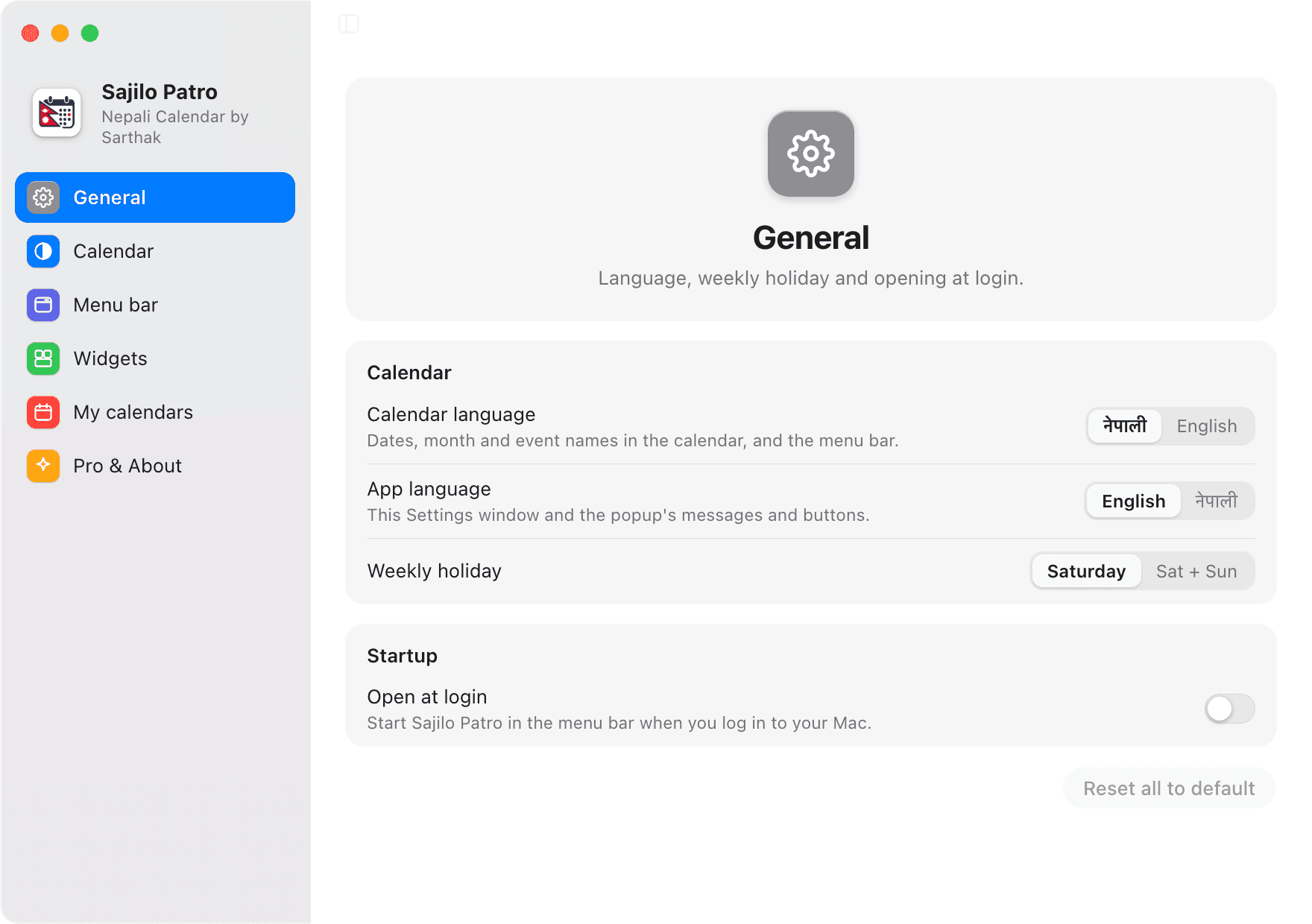
Use the calendar in Nepali or English, and the app itself (Settings and messages) in either language too.
Private and offline
No account, no ads and no tracking. Dates come from a dataset inside the app, so it works without internet, and your own calendars never leave your Mac. Only the daily update check and an optional Pro licence go online.
Over full-screen apps
The calendar opens over any full-screen app without leaving it, like the Mac's own menu bar items.
Your calendars, Google too
Your Calendar events and reminders, from Google Calendar, iCloud or Outlook, sit on their Nepali dates: a coloured dot on the day and the list when you click it. Read-only and free.
Updates in one click
Sajilo Patro looks for new versions once a day and installs them with one click in Settings → About, signed and verified. It can open at login too.
New in 2.3.1
Nepali calendar widgets on your desktop.
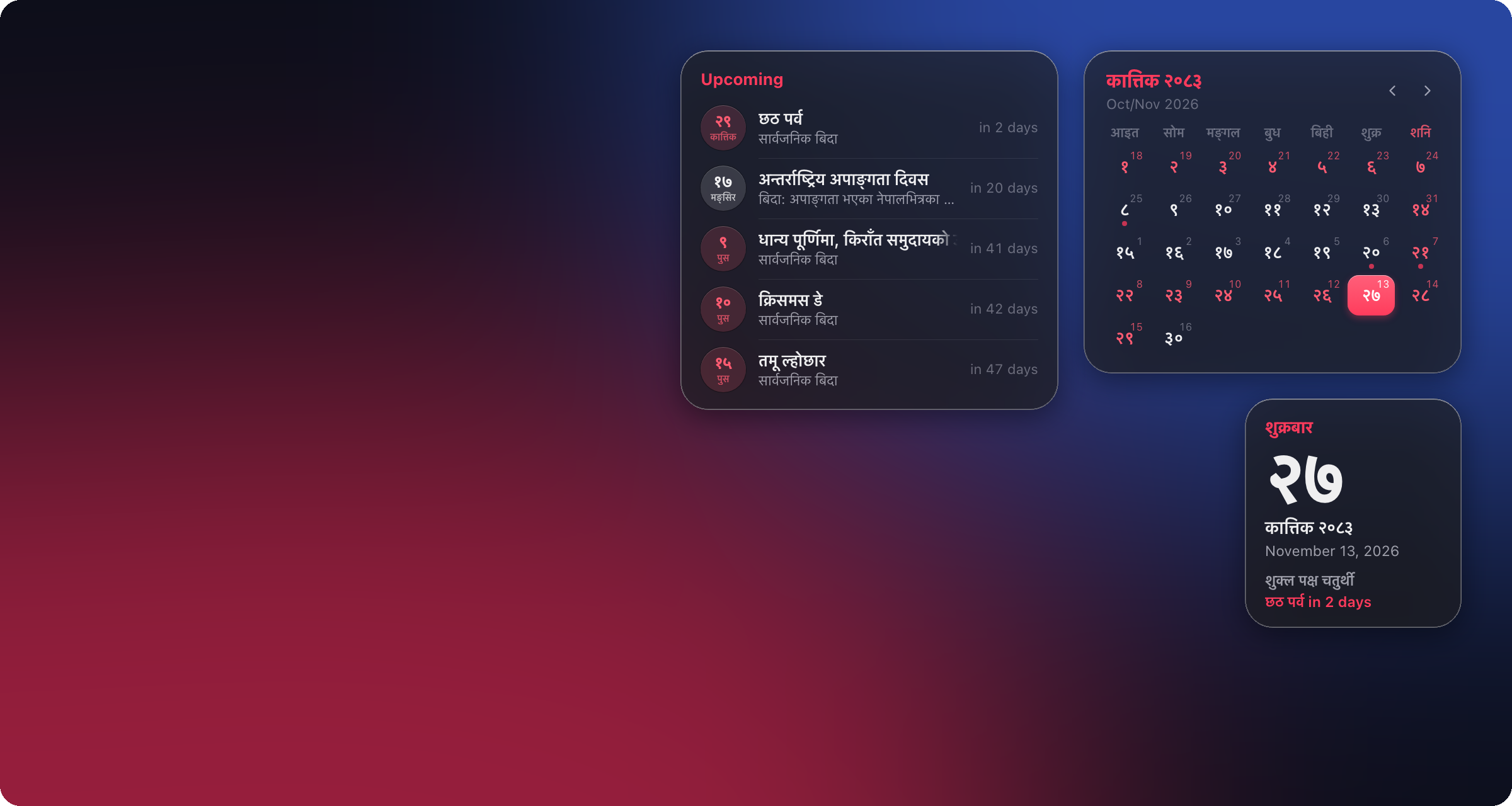
Three widgets for your wallpaper, free for everyone. They stay under your windows, on every Space, and update themselves at midnight Nepal time.
Today
A square card with a big day number, or a wide one like the popup's today card, with the AD date, tithi and today's or the next event.
Month
This month's calendar with holidays, today highlighted, AD dates and event dots. Browse other months and click a day to see its events.
Upcoming
The next 3 to 6 events, or only public holidays, with the days left for each.
Pick a size, a glass or clear background and what each widget shows in Settings → Widgets. Drag a widget to move it, right-click it to edit or remove it.
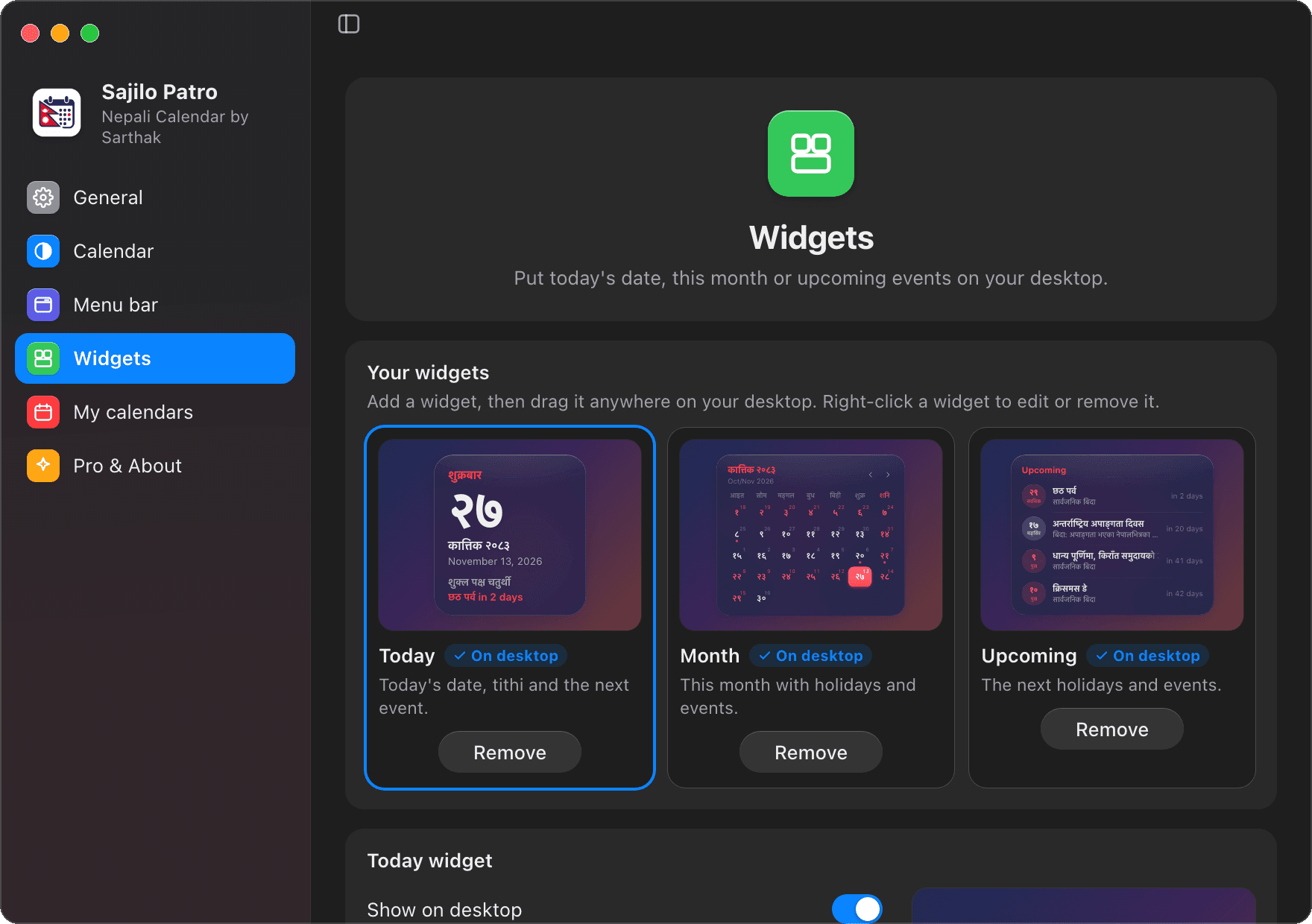
Made for macOS
A Mac Nepali calendar built for macOS.
A clean popup under the menu bar, and Settings that look and work like System Settings.
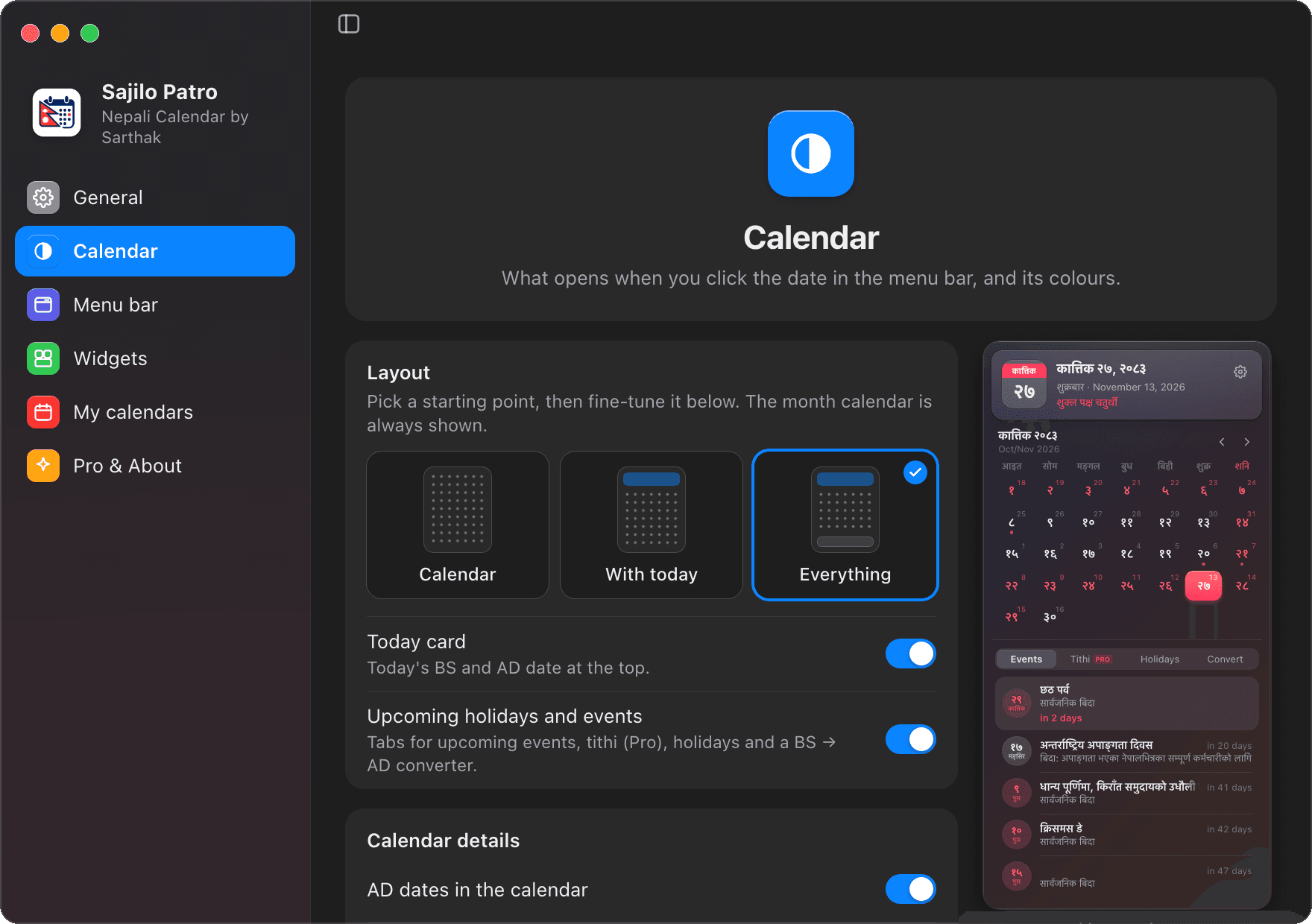
The Native Mac Difference
Why Mac Users Choose Sajilo Patro
Traditional Nepali calendars require opening cluttered browser tabs loaded with intrusive ads, or pulling out your phone in the middle of deep work. Sajilo Patro brings Bikram Sambat natively to macOS with privacy, speed, and elegance.
Always in Sight Next to Your Clock
Glance at the Bikram Sambat date (e.g. कात्तिक २०) directly in your macOS menu bar without switching windows or opening a browser. Customize it to show pure Nepali digits, day and month, weekday, or clean outlined badges.
100% Offline & Zero Battery Drain
No telemetry, no analytics, no third-party scripts, and 0% CPU consumption while idling. Built as a native universal binary for Apple Silicon (M1/M2/M3/M4) and Intel Macs, all date conversions (1970–2090 BS) work completely offline.
Nepal Public Holidays & Sunrise Tithi
Transcribed from official Nepal Gazette notices published by the Ministry of Home Affairs for BS 2083. Includes holiday applicability, Dashain & Tihar countdowns, and daily lunar tithi calculated at Kathmandu sunrise.
Engineering Behind Sajilo Patro
Want to see how this macOS app was architected?
Read the in-depth system architecture breakdown covering Tauri 2, Rust non-activating menu bar panels, and the open-source Bikram Sambat engine.
Under the Hood
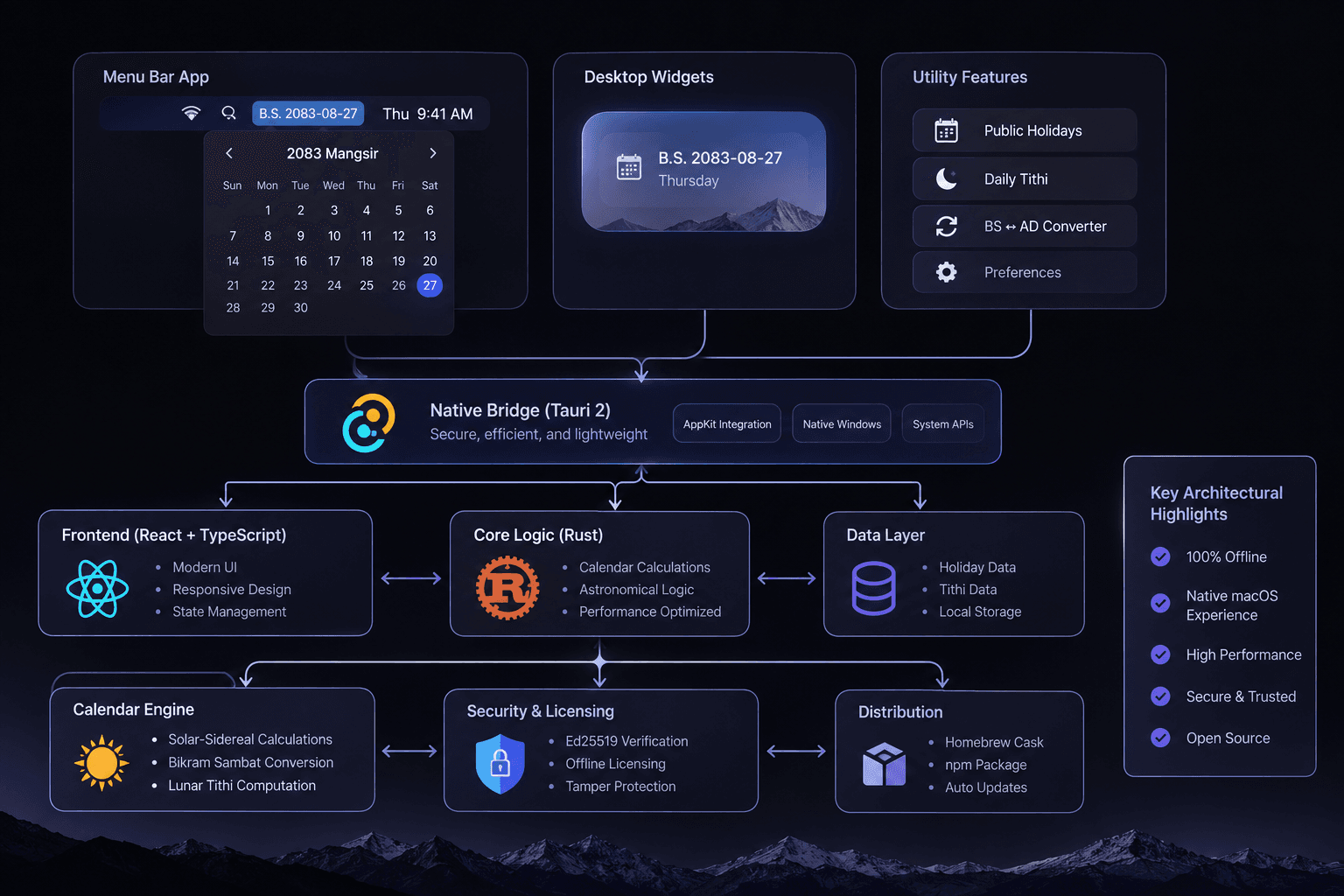
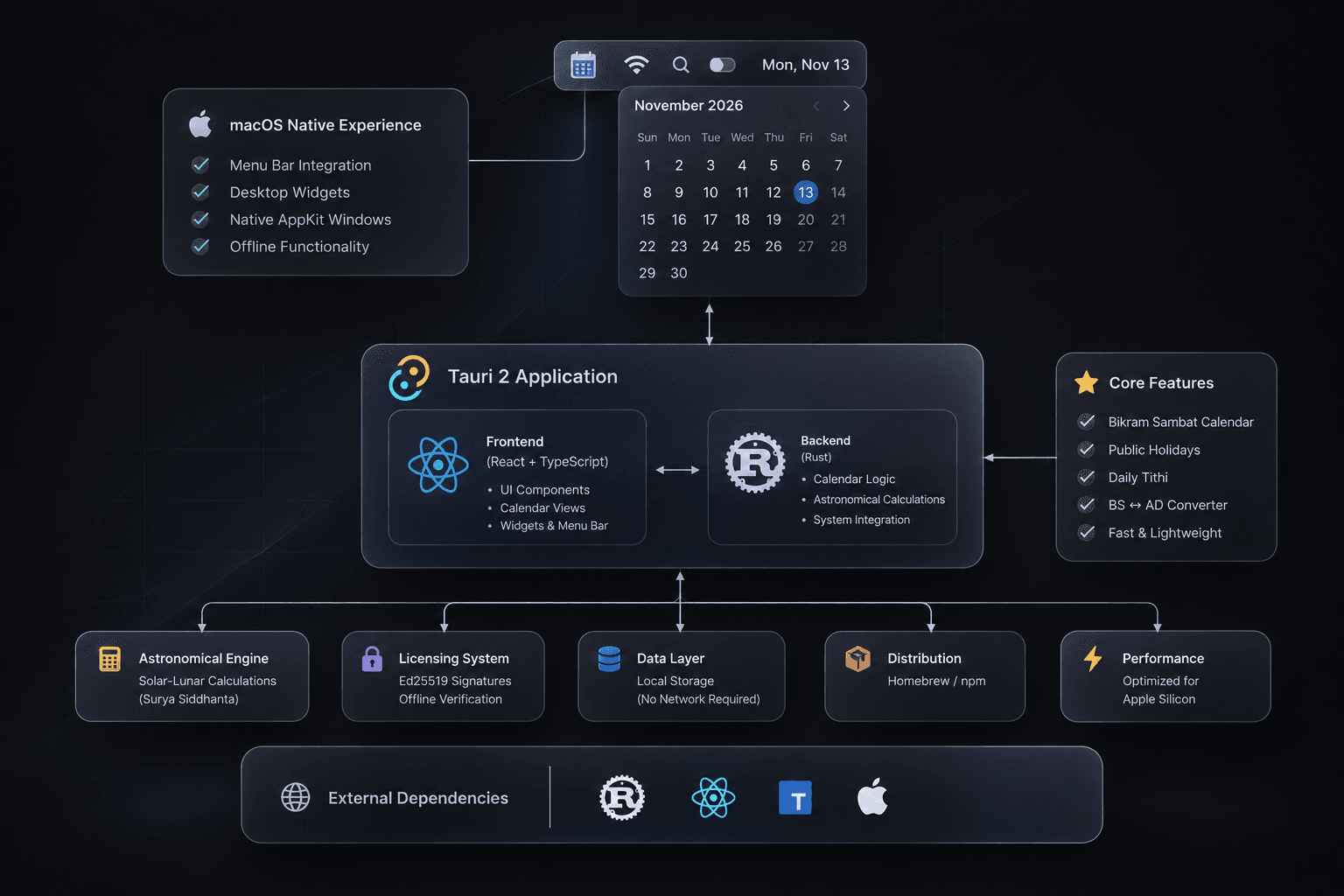
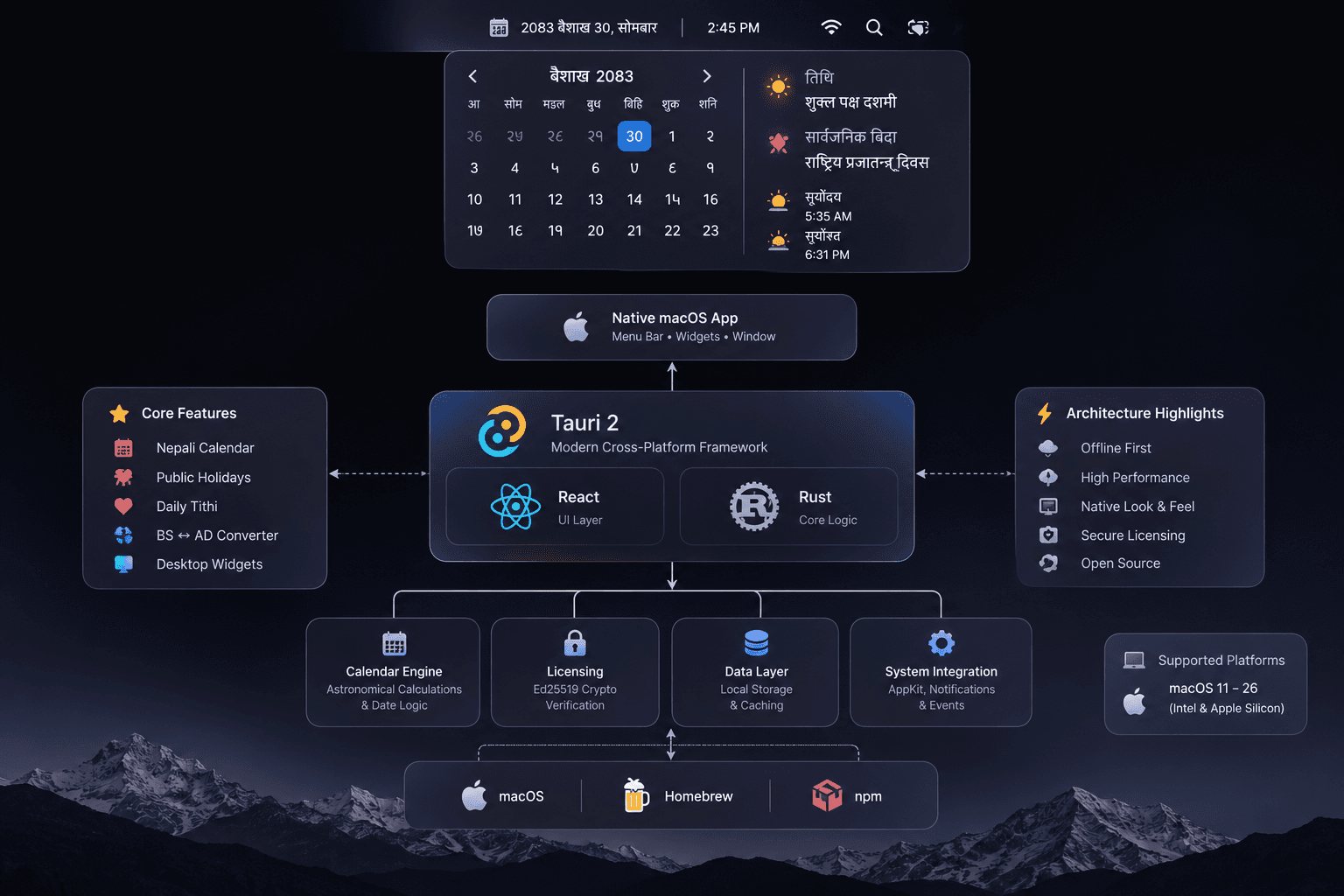
How Sajilo Patro is built.
A native macOS app on Tauri 2: a React interface and a Rust core, with the Bikram Sambat calendar engine, offline licensing and local data all on your Mac.
Sajilo Patro Pro
Make it yours.
Everything above is free. Pro is a one-time NPR 299 licence for life, on 2 Macs: yours and one more.
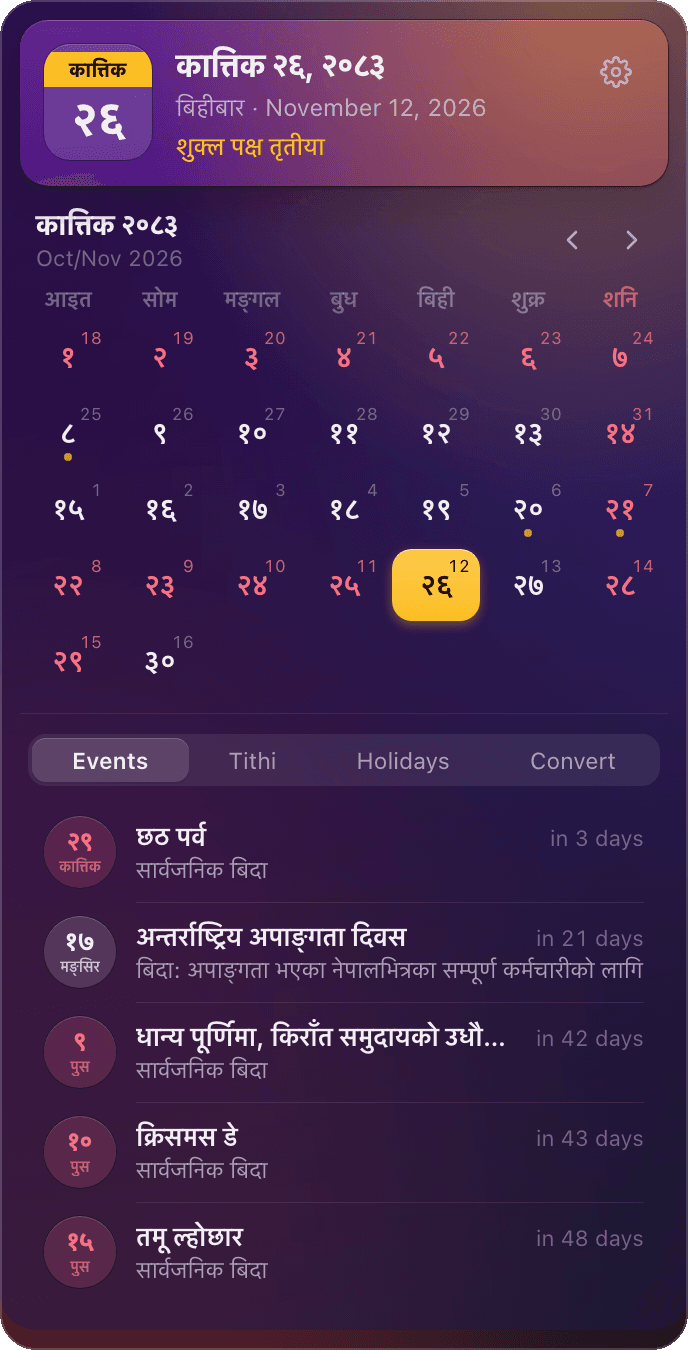
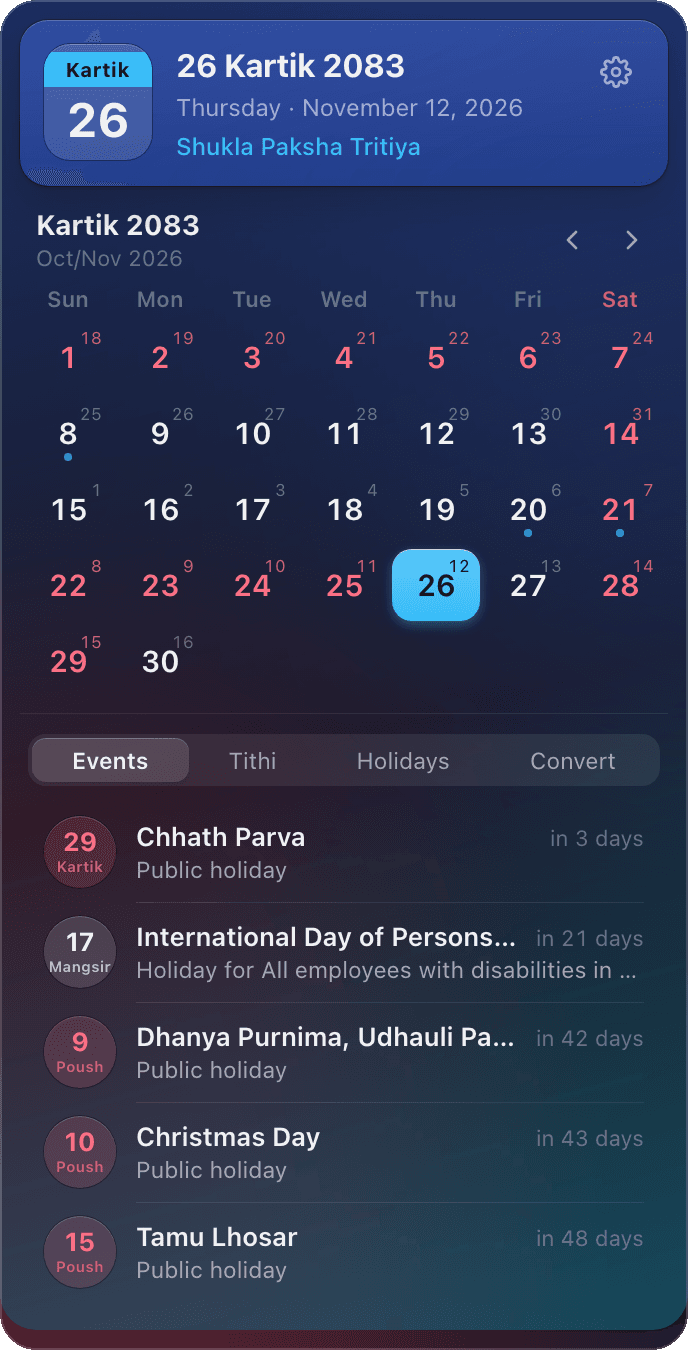
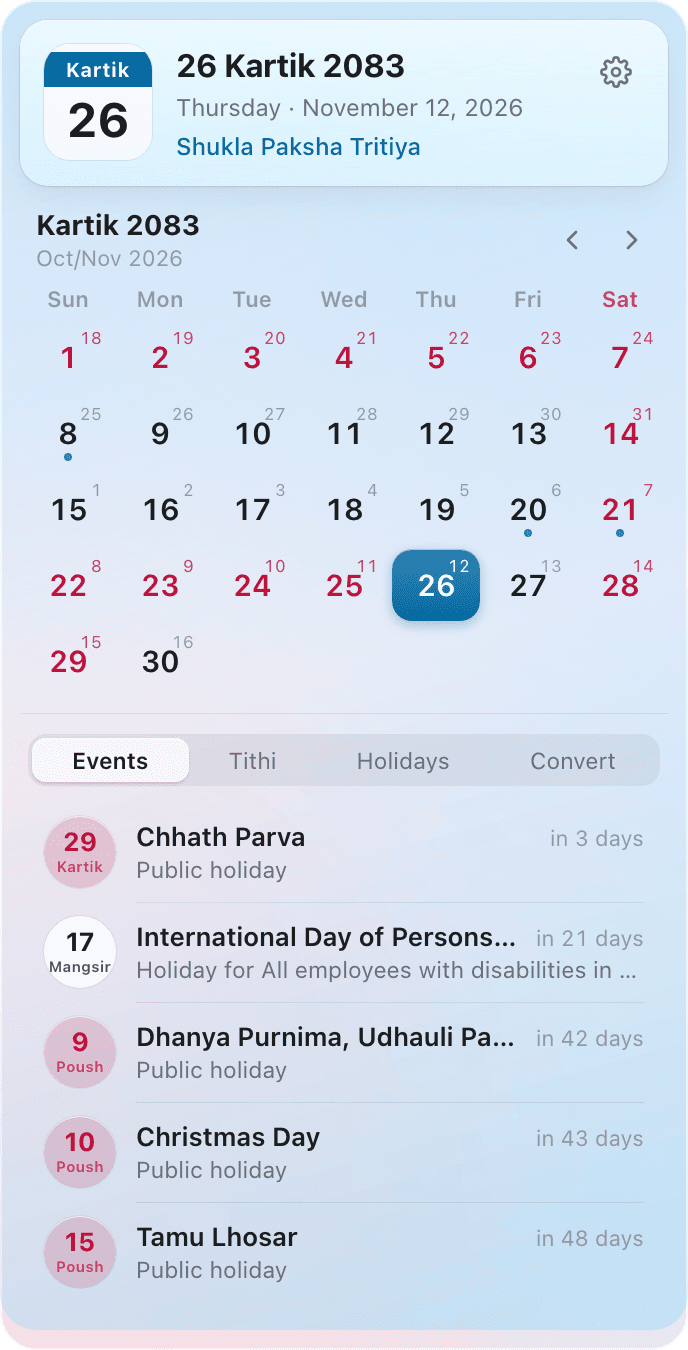
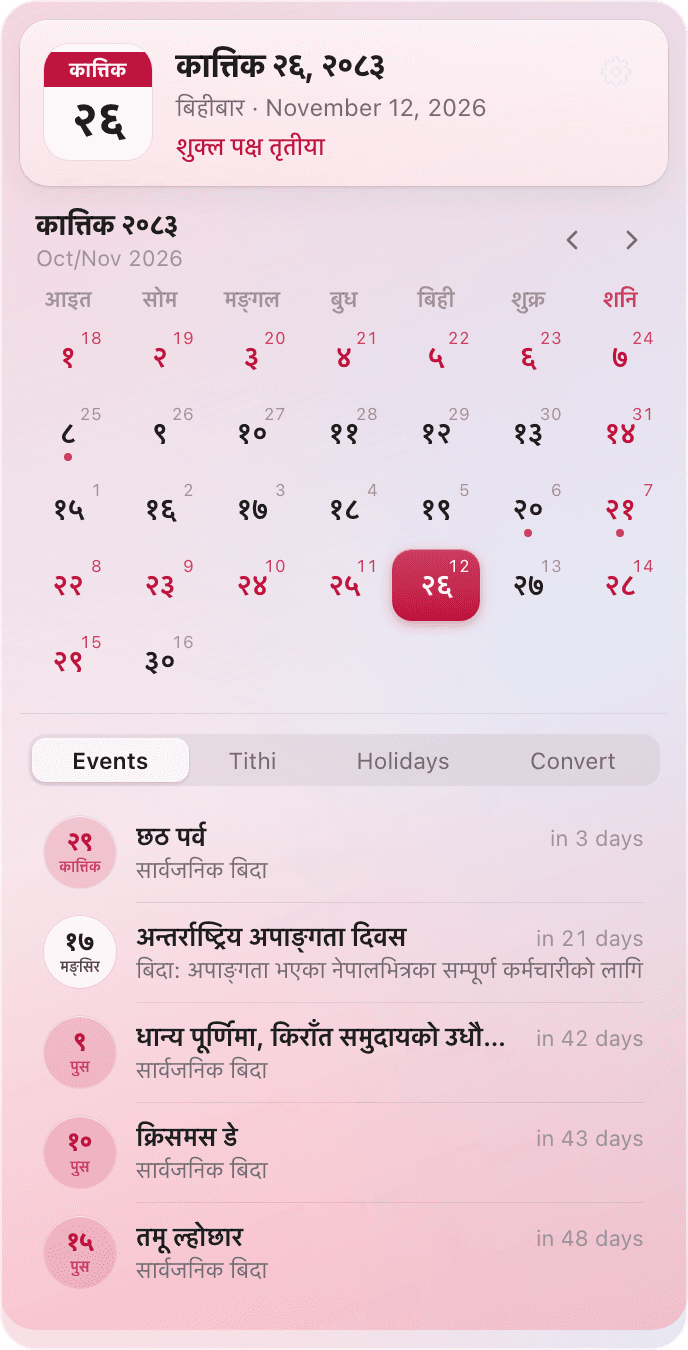
12 colour themes, light and dark
Himalaya, Lali Gurans, Phewa, Mustang, Everest Night, Terai Sunset, Tihar Lights, Dhaka, Chitwan, Rara, Jacaranda and Barkha, each in light and dark or following macOS.
Upcoming tithis
The Tithi tab lists the next Ekadashi, Purnima and Aunsi, so you know what's coming.
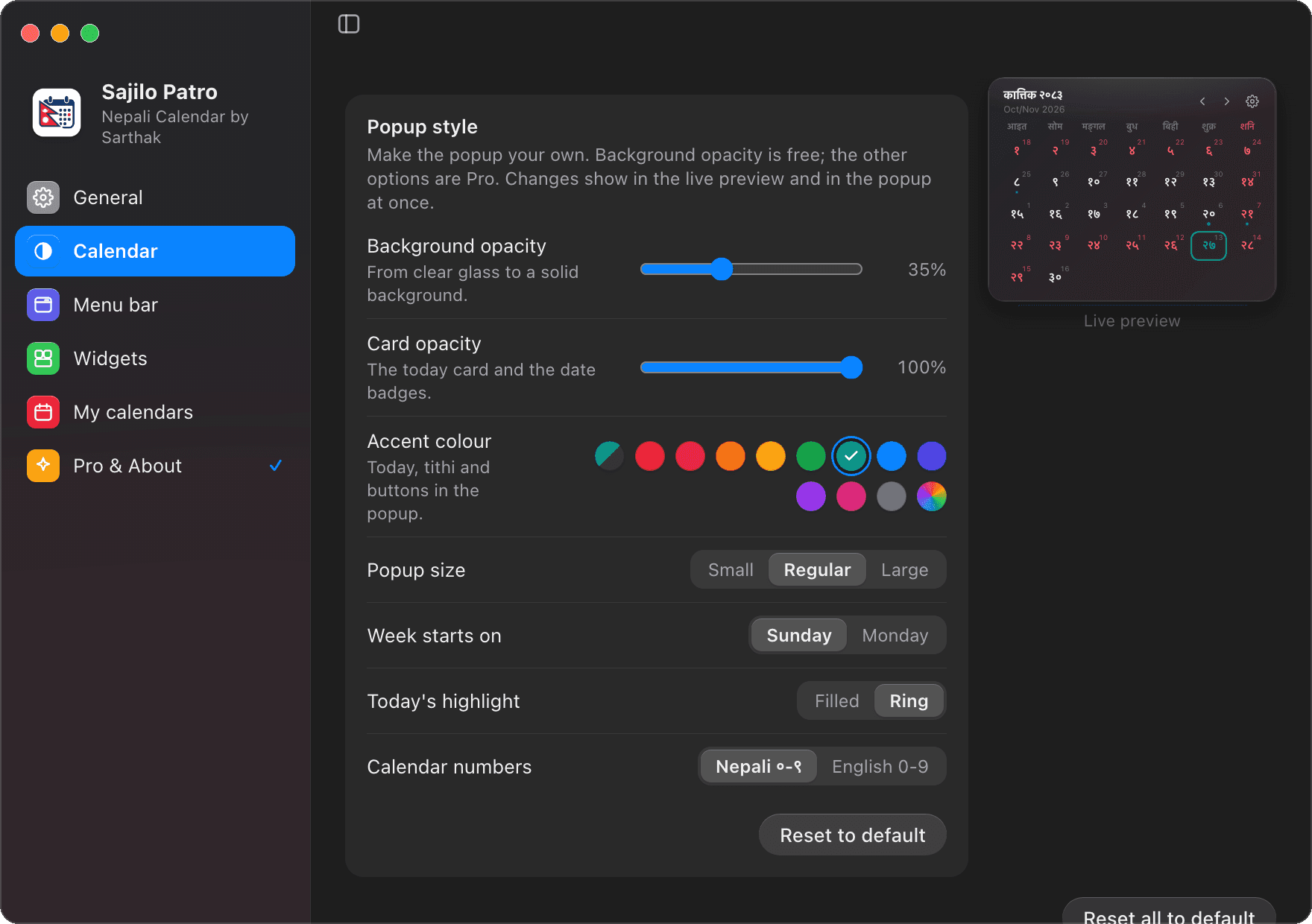
Popup customisation
Card opacity, any accent colour, small to large size, Monday weeks, a ring for today.
| Free vs Pro | FreeNPR 0, forever | ProNPR 299One-time · lifetime · 2 Macs |
|---|---|---|
| Today's Bikram Sambat date in the menu bar | Included | Included |
| Month calendar with Nepal holidays and festivals | Included | Included |
| Tithi for every day | Included | Included |
| Events, Holidays and BS → AD converter tabs | Included | Included |
| Nepali or English, works offline | Included | Included |
| Popup background opacity | Included | Included |
| Themes | System, Light, Dark | + 12 colour themes, light and dark |
| Every menu bar style, incl. the Custom builder | Included | Included |
| Just the day (२१), just the month or just the weekday | Included | Included |
| Menu bar icon left, right or hidden | Included | Included |
| Menu bar date in an outline, soft box or badge | Included | Included |
| Desktop widgets: Today, Month and Upcoming | Included | Included |
| Your Calendar events and reminders (Google, iCloud, Outlook) | Included | Included |
| One-click updates from Settings | Included | Included |
| Countdowns in English or Nepali | Included | Included |
| Upcoming Ekadashi, Purnima and Aunsi | Not included | Included |
| Card opacity, accent colour, popup size, week start, today's highlight | Not included | Included |
| Macs | Any Mac | 2 Macs per key, for life |
One Pro key works on 2 Macs for life: yours and one other person's. It binds to the first 2 Macs that activate it; removing it from a Mac doesn't free its place, and any other Mac is refused. Replaced a Mac? Get in touch and I'll move it.
Get Pro for NPR 299.
One-time payment, lifetime Pro on 2 Macs. Get in touch and I'll send you a licence key; paste it in Settings → Pro licence to unlock everything.
ssarthakxd@gmail.com
Install
Install on macOS in a minute.
With Homebrew
Sajilo Patro then updates itself from Settings → About, or use brew upgrade --cask sajilo-patro.
Direct download
Open the DMG and drag Sajilo Patro into Applications. One download for Apple Silicon and Intel Macs (macOS 11 Big Sur or later).
Download .dmgFirst launch
Sajilo Patro isn't notarized by Apple yet, so the first time you open it macOS asks you to confirm. Open System Settings → Privacy & Security, click Open Anyway next to the Sajilo Patro message and confirm. You only do this once per version.
Versions
What's new.
Every version of Sajilo Patro so far. Homebrew users get the latest with brew upgrade --cask sajilo-patro.
Version 2.3.1
LatestTidier day details- A little more room between the info icon or coloured bar and the text in a clicked day's list.
Version 2.3.0
Your calendars and Google Calendar, holidays in red- Settings → My calendars shows your Calendar events and reminders next to the Nepali dates. Google Calendar, iCloud, Outlook and every account on your Mac work, and stay in sync by themselves. Free, read-only and off until you turn it on.
- Your days get a dot in their calendar's colour, a clicked day lists your events and reminders, and your next ones appear in the Events tab and the Upcoming widget.
- Holidays are red in a day's details too, dates are no longer repeated in the lists, events a holiday calendar repeats are shown once, and long names scroll instead of being cut off.
- Simpler Settings in six panes with a short note in each and fewer, clearer options, plus separate calendar and app languages (Nepali calendar and English app by default). The Soft and Filled menu bar frames are fully rounded.
Version 2.2.0
Updates in the app, 15 themes, interactive widgets- Update with one click: Settings → About finds new versions and installs them, signed and verified. A dot on the Settings button says when one is waiting.
- 15 themes: Chitwan, Rara, Jacaranda and Barkha join the Pro themes, and every Pro theme now comes in light and dark, or follows macOS.
- The Month widget is interactive: browse months and click a day to see its events. Today and Upcoming respond when you point at and click them.
- Widgets stay on the desktop through Space swipes, Mission Control and app switches.
- Holiday dates show their small English date in red too.
Version 2.1.2
Cleaner countdowns- Click an event and it says just “in 4 days” or “Tomorrow” under it, without repeating the event's name.
- The Upcoming widget's heading reads “Upcoming”, in the same language as its “Tomorrow” and “in 2 days” labels.
Version 2.1.1
Countdowns in English by default- Countdowns read in English with the event name in Nepali, e.g. “लक्ष्मीपूजा tomorrow” or “गाई पूजा in 2 days”.
- “Tomorrow” and “in 2 days” beside upcoming events follow the countdown language. Nepali is one click away in Settings → Appearance → Countdown.
Version 2.1.0
Desktop widgets and countdowns- Desktop widgets: a Today card, a Month calendar and Upcoming events on your wallpaper, in three sizes, with a glass or clear background. Drag them anywhere; right-click to edit or remove.
- Countdown to every event in English or Nepali, e.g. “भाइटीका in 4 days” or “4 days until Bhai Tika”, also for the events of any day you click.
- Redesigned Appearance settings: layout presets and a live preview that stays in view.
- Menu bar frames: show the date as plain text, in an outline, a soft box or a badge, with your own height, corners and padding.
- The days of Dashain and Tihar (Kukur Tihar, Laxmi Puja, Bhai Tika and more) in the calendar.
- Click a day to see its details; click it again to hide them.
Version 1.2.3
The menu bar, free for everyone- Every menu bar style, the Custom builder and every icon position are free.
- Custom can show just the day (२१), just the month or just the weekday.
Version 1.2.2
Hide the icon, tabs only- Hiding the menu bar icon is free.
- The upcoming tabs start as Tabs only: click a tab to open it, again to close it.
Version 1.2.1
Works over full-screen apps- The calendar opens over full-screen apps without leaving them, like the Mac's own menu bar items.
Version 1.2.0
Help in Settings- Settings → Help answers questions about everything the app does, in English and Nepali.
- Clearer Pro licence wording: one key works on 2 Macs for life.
Version 1.1.0
Events, holidays and a date converter- New tabs under the calendar: Events, Tithi (Pro), Holidays and a BS → AD converter.
- Popup background opacity is free; the popup's height animates smoothly.
- A collapsible Settings sidebar and Reset all to default on every page.
Version 1.0.0
First release- Today's Bikram Sambat date in the menu bar, the month calendar with Nepal public holidays and tithi, themes, menu bar styles, Open at login and Pro licences.
FAQ
macOS Nepali Calendar: Frequently Asked Questions
Everything you need to know about Sajilo Patro, a free macOS Nepali calendar app for your Mac's menu bar and desktop.
To get a Nepali calendar in your macOS menu bar, install Sajilo Patro. It places today's Bikram Sambat (BS) date right beside your Mac clock. Clicking it opens a native frosted-glass popup with the complete month calendar, official Government of Nepal public holidays (BS 2083), sunrise lunar tithi, desktop wallpaper widgets, and offline BS ↔ AD conversion. It also syncs seamlessly with Google Calendar and Apple Calendar. Install it via Homebrew by running 'brew install --cask ssarthaks/tap/sajilo-patro' or download the direct universal DMG for Apple Silicon and Intel Macs. It is 100% free, runs offline, and consumes 0% CPU while idling.
Sajilo Patro is the best macOS Nepali calendar app. It is lightweight, 100% offline, and completely free to use. Designed natively for macOS, it displays today's Bikram Sambat (BS) date in your menu bar beside the clock, provides interactive desktop widgets for your wallpaper, syncs with Google Calendar and Mac Calendar, includes official Nepal public holidays (BS 2083) and Kathmandu sunrise lunar tithi, and operates with 0% CPU idle usage, zero ads, and no tracking.
Unlike mobile apps or web portals like Hamro Patro that require keeping browser tabs open with heavy ads and internet connectivity, Sajilo Patro is a dedicated macOS desktop application with 0% idle CPU usage and zero ads. Compared to CalNep, Sajilo Patro is completely free for all menu bar formats and desktop widgets, includes full Google Calendar and Apple Calendar synchronization, comes with three interactive desktop wallpaper widgets, features an open-source calendar engine (sajilo-patro on npm), and runs 100% offline.
Yes. Sajilo Patro is completely free to use, exceptionally lightweight (0% CPU idle footprint and ~2-3 MB memory), and 100% offline. The entire 120-year Bikram Sambat calendar dataset (BS 1970–2090), official Nepal government gazetted holidays, and lunar tithi calculations are bundled locally inside the app. It works without internet, requires no account, and has zero ads or background telemetry.
Yes. Sajilo Patro is a free native Nepali calendar app for macOS. It places today's Bikram Sambat (BS) date in your Mac menu bar right beside the system clock. One click opens a native frosted-glass popup featuring the complete month calendar, official Government of Nepal public holidays (BS 2083), upcoming festivals, Kathmandu-sunrise calculated lunar tithi, and simultaneous BS & AD dates. It works 100% offline with zero ads, no account registration, and no background tracking.
Install Sajilo Patro using either the direct DMG download or with Homebrew by running 'brew install --cask ssarthaks/tap/sajilo-patro'. Once launched, today's Bikram Sambat date (such as कात्तिक २०) appears immediately in your Mac menu bar. Clicking it opens the month calendar popup; in Settings → Menu Bar you can customize the format to show just the day (२१), day and month, weekday, tithi, or an outline badge.
Yes. Sajilo Patro includes three interactive desktop widgets for your wallpaper: a Today card with today's BS date and tithi, an interactive Month calendar to browse days and events, and an Upcoming events list with countdowns. Each widget comes in three sizes with Liquid Glass or clear backgrounds, works across all macOS Spaces, and updates automatically at midnight Nepal time. Desktop widgets are completely free for all users.
Yes. Turn on Settings → My calendars and allow access when macOS asks. Sajilo Patro then shows the events of your Mac's Calendar app and your reminders with a due date on their Nepali (BS) dates: a coloured dot on the day in the month calendar and the Month widget, the list under a clicked day, and your next ones in the Events tab and the Upcoming widget. Every account added to your Mac works, including Google Calendar (add your Google account in System Settings → Internet Accounts), iCloud, Outlook and Exchange, and they stay in sync by themselves. Sajilo Patro only reads your calendars, never changes them, and nothing leaves your Mac. It is free.
Yes. While mobile apps or web portals like Hamro Patro require opening browser tabs with heavy ads and internet connectivity, Sajilo Patro is a dedicated macOS desktop application. It integrates natively into the macOS menu bar, requires zero browser overhead, runs offline with 0% CPU consumption while idling, and contains no ads or tracking.
Yes. All Bikram Sambat dates (BS 1970 to 2090), official Nepal government public holidays, and lunar tithi calculations are embedded directly in the app dataset. Sajilo Patro functions completely offline without internet. It only connects to GitHub once daily for optional automatic update checks, and once to activate an optional Pro licence key.
Sajilo Patro is a universal macOS app supporting both Apple Silicon (M1, M2, M3, M4) and Intel-based Macs. It runs seamlessly on macOS 11 Big Sur, macOS 12 Monterey, macOS 13 Ventura, macOS 14 Sonoma, macOS 15 Sequoia, and macOS 26 Tahoe.
Yes. The public holidays for BS 2083 are transcribed directly from the official Government of Nepal Gazette (Nepal Rajpatra) published by the Ministry of Home Affairs, specifying national, regional, and community-specific holidays (including Dashain and Tihar). Daily lunar tithi is calculated astronomically at Kathmandu sunrise.
Yes. Sajilo Patro is completely free to download and use on Mac, with no ads and no time limit. An optional lifetime Pro licence (NPR 299 for 2 Macs) unlocks 12 color themes (like Everest Night, Himalaya, and Tihar Lights), card opacity sliders, accent colors, and the upcoming Ekadashi, Purnima, and Aunsi list. All menu bar styles, desktop widgets, countdowns, and converters remain free forever.
Yes. Inside the Sajilo Patro menu bar popup, the Convert tab provides a fast two-way BS ↔ AD date converter powered by the sajilo-patro engine, converting any date from BS 1970 to BS 2090 instantly without internet.
A native macOS menu bar Nepali calendar app keeps today's Bikram Sambat date visible next to your Mac's clock all day, opens in one click even over full-screen apps, puts Today, Month and Upcoming desktop widgets on your wallpaper, and works offline with no browser tabs or ads.
For developers
Building something?
The calendar behind Sajilo Patro is a free npm package: BS ↔ AD conversion, Nepal public holidays, working days and payroll.